Background and inspiration
I had the opportunity to attend KubeCon 2025 in London, and it was inspiring to see the momentum in the Kubernetes ecosystem. As expected, AI was a major theme. But what really stood out was the widespread focus on OpenTelemetry. Observability and monitoring are clearly top priorities in modern infrastructure.
That said, I felt Developer Experience (DX) didn’t receive quite as much attention as it deserves. As Platform Engineers, it’s easy to get caught up in solving the challenges that affect us, like infrastructure automation, scaling, or operational tooling. But we are not the end users of the platform, we build it for developers.
It’s essential to remember that developers are the ones shipping the features that drive business value. Our role should be to support them by reducing friction, removing blockers, and enabling them to stay in a productive flow state. A good platform shouldn’t just be robust, it should be intuitive and enabling for its users.
Improving DX requires us to step out of our own bubble and see the platform from the developers’ perspective. That means understanding their pain points and proactively designing solutions that simplify their workflows.
One project that caught my eye at KubeCon was Dapr. It provides a set of building blocks that abstract common application concerns — like service-to-service communication, state management, and pub/sub messaging. I see potential in Dapr to streamline development workflows and improve the overall experience for teams building on top of our platform. I’m looking forward to exploring how we can leverage it to deliver more value to our developers.
In this blog post, I’ll specifically focus on the pub/sub messaging abstraction that Dapr offers.
Introduction to Dapr
So what is Dapr? Microsoft originally created Dapr—the Distributed Application Runtime (Dapr) in 2019 as an open‑source incubated project to simplify the construction of cloud‑native and microservices applications. In 2021, Microsoft donated Dapr to the Cloud Native Computing Foundation (CNCF), which now manages it, and the project attained graduated status in November 2024.
Quoted from their website, Dapr describes itself as:
Dapr is a portable, event-driven runtime that makes it easy for any developer to build resilient, stateless and stateful applications that run on the cloud and edge and embraces the diversity of languages and developer frameworks. Leveraging the benefits of a sidecar architecture, Dapr helps you tackle the challenges that come with building microservices and keeps your code platform agnostic.
In my opinion the most important aspect of Dapr, at least in the context of pub/sub messaging lies at the end of that statement: "... keeps your code platform agnostic". Dapr allows our application to integrate with a pub/sub messaging system in an agnostic way. Meaning your application doesn’t care about the messaging system in use. In fact, your application doesn’t even know the message broker that you are using, it’s all abstracted away by Dapr.
Why that is great? Well, imagine you have a decoupled application with let’s say ten different microservices. Now all of them have to integrate tightly with the message broker that you are planning to use, be it Redis, Kafka, AWS SNS/SQS or Azure Event Hubs. The more microservices you have, the more boilerplate code you have in your applications. Sure, you can create your own library that acts as a bridge to these components, but now you have even more code to maintain. Also think about companies that have multiple teams, each implementing different solutions. The amount of code that has to be written, tested, deployed and maintained to interact with these message brokers can grow quite fast - and is prone to contain bugs.
Wouldn’t it be great that all this logic can be decoupled from the application? Say you want to migrate from Redis to AWS SNS, because you want to make use of Public Cloud services instead of managing the infrastructure yourself. You now have a tricky migration to deal with, Dapr takes away these issues by decoupling the pub/sub integration from the application.
The technical stuff
Target architecture
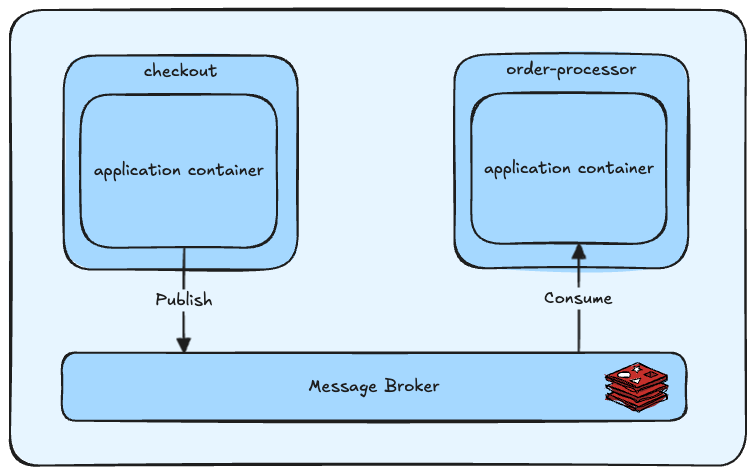
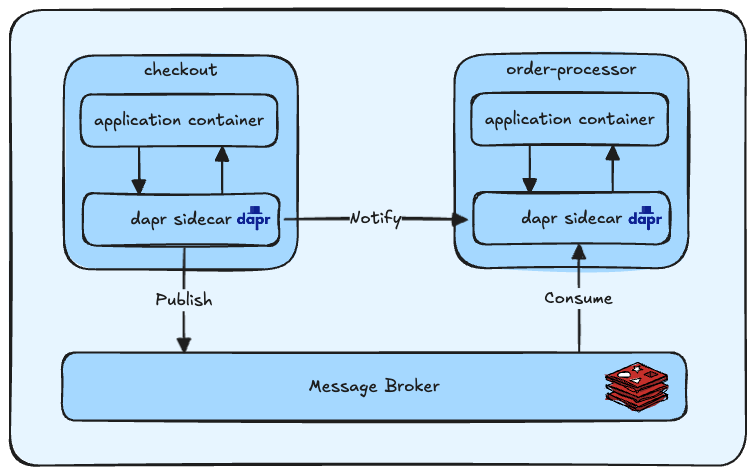
To visualize the abstraction layer provided by Dapr when using the pub/sub components, I have created the following diagrams. In this blog post we will use the following two services as examples: The checkout service and the order-processor service. The checkout service will produce message, while the order-processor service will consume the messages.
The first diagram will visualize a traditional approach, where the application directly integrates with the messaging broker. In this example I’ll use Redis, which I will later on use in my Dapr PoC as well. While there is nothing wrong with this approach, it doesn’t scale that well and requires to implement timeouts, retries and circuit breakers manually, more on that later.
Dapr introduces a sidecar pod that will be running next to your application pod. From that pod, the connections from/to the messaging broker will be made. Using Dapr, only Pods requiring access to the broker will actually start the sidecar pod.
This post focuses on Dapr’s pub/sub functionality, although Dapr offers many more capabilities that are beyond the scope of this post. For me personally, I find the pub/sub functionality the most interesting.
Installing Dapr
First of all, we have to install Dapr in our Kubernetes cluster. Dapr offers a Helm Chart and the installation instructions can be found here. I’m using Argo CD in my local environment and am deploying the following ApplicationSet. By the time you are reading this, there might be a newer version of the Chart available.
| |
Great! Let Argo CD do it’s work and deploy all the resources. To actually make use of Dapr, we have to generate some events, that means we have to deploy resources to our cluster that does all of that. In the next chapter, we will create two sample applications - the checkout and order-processor microservices.
Dapr Component
A Dapr component is like a plug-in that tells Dapr how to interact with external systems. It basically instructs Dapr that it can use Redis as a pubsub broker. Configuration of a Component is really simple, a Custom Resource is provided by Dapr.
Note: this component must be created in both the checkout and order-processor namespaces.
| |
I’m running a HA Redis cluster, provided by the Bitnami chart for Redis. Setting up the cluster is left as an exercise for the reader. Inside my Kubernetes cluster, Redis is exposed by a Service that is reachable on redis-master.redis.svc:6379. I’ve disabled authentication in my Redis setup to not make things more complicated than necessary.
Two sample applications
Dapr provides two ‘quickstart’ applications to get up to speed with Dapr. You can find the source for both sample applications at the following links:
I highly recommend looking at the source code to be able to fully understand how Dapr works, I’ll highlight the most important lines of codes below.
Producer - checkout
The checkout microservice is our producer and will publish messages to the broker. But instead of integrating directly with the broker, it instead sets up a Dapr client using the SDK.
First, we define constants to specify which Dapr component and topic the application should publish messages to. Note that the pubsubComponentName matches the name of the Component we’ve created in the previous chapter.
| |
After the client has been configured, we generate 10 fake “orders” and use the client.PublishEvent function, provided by the Dapr SDK, to send messages to the broker.
| |
Consumer - order-processor
Now let’s jump over to the consumer side, the order-processor service, where things look pretty similar.
The consumer will configure the subscription configuration as follows
| |
Next, we start a Dapr service on a specified port. This server will listen for events coming from Dapr clients, in our case, the checkout service.
| |
We start an event handler that will trigger the eventHandler function every time a client sends messages to the orders topic.
The last step is printing out the message received.
| |
Now we understand how the pub and sub components communicate with each other using Dapr. I’m deploying these two applications using a simple Helm Chart using Argo CD and have built and pushed the images to a Docker registry running in my cluster. To keep this blog post concise, I will not cover this part. If you’d like to know more about this setup, I do a similar thing in my other blog post: Exploring Mutating Webhooks in Kubernetes.
Seeing it in action
Checking the logs of the producer, the checkout service, I’m seeing that messages are successfully published to my message broker using Dapr.
| |
On the receiving side, the logs show me that the messages are being processed.
| |
By jumping into the redis-master-0 Pod and issuing the redis-cli monitor command, the communication is visible. Apparently Dapr adds some metadata to it as well!
| |
Cool! Without using any Redis library, my two applications are able to communicate with each other seamlessly.
Switching to another message broker
The big benefit of abstracting away the integration to the message broker in use, is that it allows you to switch seamlessly to another backend. In this example, I will deploy a simple Kafka cluster and adjust the Component we defined before and point to our Kafka cluster instead.
I’m using the Kafka chart provided by Bitnami to deploy a HA Kafka Cluster. I’m setting listeners.client.protocol to PLAINTEXT so I don’t have to deal with any kind of authentication. Again, use at your own risk ;)
We let Argo CD deploy the Chart and in the meantime we can adjust our Component and switch over to Kafka. For a list of available pubsub types , please refer to the official Dapr documentation.
| |
After the adjusted Component has been deployed, we can do a rolling restart of our Deployments and the message broker has been switched from Redis to Kafka. All without touching the application code, a powerful abstraction!
A feature that is currently in preview are Declarative subscriptions. With this new feature, subscriptions can be made declarative and “hot reloading” is supported as well. Interesting to keep an eye on.
Resiliency
Dapr provides the capability for defining and applying fault tolerance resiliency policies via a Resiliency Custom Resource. Using these policies, you are able to define timeouts, retries and circuit breakers. The configuration allows you to define different timeouts/retries or circuit breakers for different type of messages. In our example, we’ll keep it simple and just configure a DefaultTimeoutPolicy - a policy that applies to all operations of a Component.
| |
The Resiliency spec allows a lot of specific configuration options. I’m not going more in-depth than the above, but it’s really interesting to tinker with the settings and see what the possibilities are.
Conclusion
I’m convinced that Dapr has real potential to improve Developer Experience. As a graduated CNCF project with continued backing from Microsoft, it’s a well-established and actively maintained tool. The documentation is clear, and the setup process was surprisingly smooth.
That said, Dapr is also yet another component in the platform stack. One more abstraction, and one more thing that can fail. As Platform Engineers, we have to weigh the operational overhead and complexity of introducing new tools, even when they promise to simplify development.
I’m still on the fence about whether the tradeoff is worth it in every case. I’d love to exchange thoughts with developers who are using or evaluating Dapr, since their perspective on its real-world impact could be very different from mine.
All in all, this was a fascinating deep dive and I’m glad I came across Dapr during KubeCon.