Background and inspiration#
Applying policies to Kubernetes clusters has become increasingly popular over the last few years. These policies allow us to define guardrails around user actions and ensure that best practices are consistently applied. For example, it’s generally considered bad practice to use the latest tag on Docker images. Since tags should be immutable, there should be no need for this practice—especially not on production-grade clusters. With a policy engine such as OPA Gatekeeper or Kyverno, you can prevent end users from applying manifests with specific values, such as using the latest tag in a Pod specification.
But I’ve always wondered: how do these policy engines actually work “under the hood”? How are calls to the API server verified? How are the HTTP requests constructed? How is it decided which Kubernetes resources are reviewed? Sure, I could simply use Kyverno, apply a policy, and move on with my life—but where’s the fun in that?
In general, I’m a strong advocate for understanding concepts rather than just tools. Anyone can pick up tools like Kubernetes, Kyverno, or OPA Gatekeeper and master them. However, from my experience, IT becomes much easier when you focus on understanding the underlying concepts. When you master concepts, learning a new tool or programming language becomes much faster. Moreover, debugging tough issues in your daily job becomes far simpler when you know (or can infer, based on the concept) what the tool you’re using is actually doing—or trying to do.
For this very reason, I didn’t jump straight into Kyverno or OPA. Instead, I wanted to first understand the concept of admission controllers. For me, the best way to grasp a concept is to actually work with it, and that’s the motivation behind this blog post.
The technical stuff#
Target architecture#
As always, to give my few readers an overview of what we’re trying to achieve in this blog post, I’ve created the following diagram:
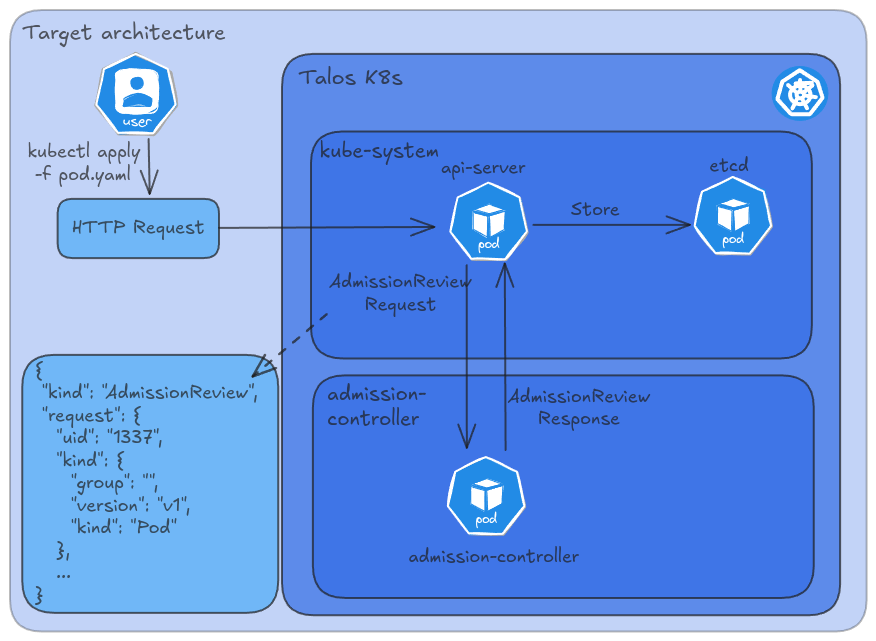
In this diagram, you can see that the api-server will send an AdmissionReview resource to an admission controller. The admission controller Pod does some internal magic and returns an AdmissionReview resource object to the api-server. To clarify, both the Request and Response are of type AdmissionReview. The Request types are coming from the api-server and are sent to the admission controller, and the Response type is going in the other direction, from the admission controller to the api-server.
In this blog post, we’ll take a closer look at both the Request and Response components of this AdmissionReview resource.
Admission controllers? What?#
When I started this blog post, I had to read up a bit on the official Kubernetes documentation to better understand what an admission controller actually is.
An admission controller is a piece of code that intercepts requests to the Kubernetes API server prior to the persistence of the object, but after the request is authenticated and authorized.
Admission controllers may be validating, mutating, or both. Mutating controllers may modify objects related to the requests they admit; validating controllers may not.
There are two primary types of admission controllers: mutating and validating. In this blog post, we will focus on the mutating admission controller, as it aligns with the objectives outlined in the goal of this blog post section regarding the desired modifications within our cluster.
Goal of this blog post#
Let me first clarify; I don’t know if the goal I’m describing below is actually something you should want on your clusters, but that doesn’t matter for now. It’s about learning new stuff, right? Let’s dive in!
Most companies use Alertmanager to send Kubernetes-related alerts to an incident management tool. Alertmanager enables routing rules based on Prometheus labels associated with specific resources. However, it’s important to note that Prometheus labels are not the same as Kubernetes resource labels. While a Kubernetes resource label might be transformed into an Alertmanager label, this isn’t always the case.
One idea I’ve been considering is to have all Kubernetes resources within a namespace automatically inherit a label set on the namespace where the resource is created. For example:
1
2
3
4
5
6
7
| ---
apiVersion: v1
kind: Namespace
metadata:
name: my-namespace
labels:
team: platform
|
The goal is to ensure that all resources, such as Pods and Deployments, automatically inherit the team label. This eliminates the risk of forgetting to set the label manually when adding new resources, such as in a Helm chart. By applying the label at the namespace level and managing it through a mutating webhook controller, the process becomes fully automated, removing the need for manual intervention.
So if your Helm Chart creates a Pod like this:
 1
 2
 3
 4
 5
 6
 7
 8
 9
10
11
12
13
14
| ---
apiVersion: v1
kind: Pod
metadata:
name: nginx
namespace: my-namespace
labels:
app: nginx
spec:
containers:
- name: nginx
image: nginx:1.14.2
ports:
- containerPort: 80
|
Then, our mutating webhook should automatically retrieve the team label from the namespace where that Pod is being created, in this case, from the my-namespace namespace.
Finally, the Pod spec that should be stored in etcd should be like this:
 1
 2
 3
 4
 5
 6
 7
 8
 9
10
11
12
13
| ---
apiVersion: v1
kind: Pod
metadata:
name: nginx
namespace: my-namespace
team: platform # <-- Should be added by our mutating admission controller
spec:
containers:
- name: nginx
image: nginx:1.14.2
ports:
- containerPort: 80
|
This allows us to configure Prometheus in a way to take the team label from every Kubernetes resource and applies it as Prometheus label. This part is out of the scope of this blog post. But essentially you should be able to use kubernetes_sd_config to apply the resource label as a Prometheus label.
Exploring the AdmissionReview request#
As you can read in the target architecture, the api-server will send an AdmissionReview request to the admission controller. Let’s have a look at the data structure of this object.
 1
 2
 3
 4
 5
 6
 7
 8
 9
10
11
12
13
14
15
16
17
18
19
20
21
22
23
24
25
26
27
28
29
30
31
32
33
34
35
36
37
38
39
40
41
42
43
44
45
46
47
| {
"kind": "AdmissionReview",
"apiVersion": "admission.k8s.io/v1",
"request": {
"uid": "a2163b9d-5871-470f-a619-a164834179a7",
"kind": {
"group": "",
"version": "v1",
"kind": "Pod"
},
"resource": {
"group": "",
"version": "v1",
"resource": "pods"
},
"namespace": "default",
"operation": "CREATE",
"userInfo": {
"username": "system:serviceaccount:kube-system:default",
"uid": "a2163b9d-5871-470f-a619-a164834179a7",
"groups": [
"system:serviceaccounts",
"system:serviceaccounts:kube-system",
"system:authenticated"
]
},
"object": {
"apiVersion": "v1",
"kind": "Pod",
"metadata": {
"name": "nginx",
"namespace": "my-namespace",
"labels": {
"app": "nginx"
}
},
"spec": {
"containers": [
{
"name": "nginx",
"image": "nginx:1.14.2"
}
]
}
}
}
}
|
Cool, it shows us some metadata about the request itself, though we are mostly interested in the request.object field, since that’s the one we have to mutate.
Developing the mutating admission controller#
One thing that definitely helped me out was that I had captured the AdmissionReview request. This way, during my local development iterations, I could just replay the POST request to my admission controller. Initially, it was all done without interaction with Kubernetes yet, as I was just trying to modify the Pod in that review request.
The curl I used to test my controller, was the following:
1
| $ curl -X "POST" -H "Content-Type: application/json" --data-binary @admission-review.json "http://localhost:8080/add-label"
|
Later, when I finally was able to mutate the object, I began to implement the client by using my local kubeconfig file. After that worked, I deployed my controller to the cluster and configured some additional resources to glue everything together.
The final result of my admission controller is like this.
  1
  2
  3
  4
  5
  6
  7
  8
  9
 10
 11
 12
 13
 14
 15
 16
 17
 18
 19
 20
 21
 22
 23
 24
 25
 26
 27
 28
 29
 30
 31
 32
 33
 34
 35
 36
 37
 38
 39
 40
 41
 42
 43
 44
 45
 46
 47
 48
 49
 50
 51
 52
 53
 54
 55
 56
 57
 58
 59
 60
 61
 62
 63
 64
 65
 66
 67
 68
 69
 70
 71
 72
 73
 74
 75
 76
 77
 78
 79
 80
 81
 82
 83
 84
 85
 86
 87
 88
 89
 90
 91
 92
 93
 94
 95
 96
 97
 98
 99
100
101
102
103
104
105
106
107
108
109
110
111
112
113
114
115
116
117
118
119
120
121
122
123
124
125
126
127
128
129
130
131
132
133
134
135
136
137
138
139
140
141
142
143
144
145
146
147
148
149
150
151
152
153
154
155
156
157
158
159
160
161
162
163
164
165
166
167
168
169
170
171
172
173
174
175
176
177
178
179
180
181
182
183
184
185
186
187
188
189
190
191
192
193
194
195
196
197
198
199
200
201
202
203
204
205
206
207
208
209
210
211
212
213
214
215
216
217
218
219
220
221
222
223
224
225
226
227
228
229
230
231
232
233
234
235
236
237
238
239
240
241
242
| package main
import (
"context"
"encoding/json"
"fmt"
"net/http"
"os"
"path/filepath"
"sync"
"github.com/sirupsen/logrus"
admissionv1 "k8s.io/api/admission/v1"
metav1 "k8s.io/apimachinery/pkg/apis/meta/v1"
"k8s.io/apimachinery/pkg/apis/meta/v1/unstructured"
"k8s.io/apimachinery/pkg/conversion"
"k8s.io/apimachinery/pkg/runtime"
"k8s.io/client-go/kubernetes"
"k8s.io/client-go/rest"
"k8s.io/client-go/tools/clientcmd"
)
// Global variables
var (
clientset *kubernetes.Clientset
initOnce sync.Once // Ensures that the client is initialized only once.
)
// GetKubeClient provides a thread-safe singleton instance of the Kubernetes client.
func GetKubeClient() (*kubernetes.Clientset, error) {
var err error
initOnce.Do(func() {
clientset, err = initializeClient()
})
return clientset, err
}
// initializeClient initializes the Kubernetes client.
func initializeClient() (*kubernetes.Clientset, error) {
config, err := rest.InClusterConfig()
if err != nil {
logrus.Warn("Falling back to kubeconfig: ", err)
kubeconfig := getKubeConfigPath()
config, err = clientcmd.BuildConfigFromFlags("", kubeconfig)
if err != nil {
return nil, fmt.Errorf("failed to build kubeconfig: %w", err)
}
}
clientset, err := kubernetes.NewForConfig(config)
if err != nil {
return nil, fmt.Errorf("failed to create Kubernetes clientset: %w", err)
}
logrus.Info("Kubernetes client initialized successfully")
return clientset, nil
}
// getKubeConfigPath determines the kubeconfig path.
func getKubeConfigPath() string {
if kubeconfig := os.Getenv("KUBECONFIG"); kubeconfig != "" {
return kubeconfig
}
return filepath.Join(homeDir(), ".kube", "config")
}
// homeDir returns the user’s home directory.
func homeDir() string {
if h := os.Getenv("HOME"); h != "" {
return h
}
return os.Getenv("USERPROFILE")
}
func main() {
setLogger()
http.HandleFunc("/add-label", addLabelHook) // Webhook endpoint.
http.HandleFunc("/health", serveHealth) // Health check endpoint.
port := getPort()
if os.Getenv("TLS") == "true" {
logrus.Infof("Starting server on port %s with TLS", port)
logrus.Fatal(http.ListenAndServeTLS(port,
"/etc/mutating-webhook/tls/tls.crt",
"/etc/mutating-webhook/tls/tls.key", nil))
} else {
logrus.Infof("Starting server on port %s", port)
logrus.Fatal(http.ListenAndServe(port, nil))
}
}
// getPort retrieves the port or defaults to ":8080".
func getPort() string {
if port := os.Getenv("PORT"); port != "" {
return ":" + port
}
return ":8080"
}
// serveHealth provides a basic health check endpoint.
func serveHealth(w http.ResponseWriter, r *http.Request) {
logrus.WithField("uri", r.RequestURI).Debug("Health check OK")
fmt.Fprint(w, "OK")
}
// addLabelHook processes AdmissionReview requests and adds the "team" label if applicable.
func addLabelHook(w http.ResponseWriter, r *http.Request) {
logger := logrus.WithField("uri", r.RequestURI)
in, err := parseRequest(r)
if err != nil {
logger.Error(err)
http.Error(w, err.Error(), http.StatusBadRequest)
return
}
out, err := addLabel(*in)
var admissionReviewResponse admissionv1.AdmissionReview
admissionReviewResponse.Response = out
admissionReviewResponse.SetGroupVersionKind(in.GroupVersionKind())
if err != nil {
logger.Error(fmt.Sprintf("could not generate admission response: %v", err))
http.Error(w, err.Error(), http.StatusInternalServerError)
return
}
w.Header().Set("Content-Type", "application/json")
jout, _ := json.Marshal(admissionReviewResponse)
logger.Debugf("AdmissionResponse: %s", jout)
fmt.Fprintf(w, "%s", jout)
}
// addLabel adds the "team" label if the namespace has it; otherwise, allows the request unmodified.
func addLabel(ar admissionv1.AdmissionReview) (*admissionv1.AdmissionResponse, error) {
// Get the Kubernetes client.
c, err := GetKubeClient()
if err != nil {
return nil, fmt.Errorf("failed to get Kubernetes client: %w", err)
}
// Convert the raw JSON to an unstructured Kubernetes object.
var obj runtime.Object
var scope conversion.Scope
err = runtime.Convert_runtime_RawExtension_To_runtime_Object(&ar.Request.Object, &obj, scope)
if err != nil {
return nil, fmt.Errorf("failed to convert object: %w", err)
}
innerObj, err := runtime.DefaultUnstructuredConverter.ToUnstructured(obj)
if err != nil {
return nil, fmt.Errorf("failed to convert to unstructured: %w", err)
}
u := unstructured.Unstructured{Object: innerObj}
// Fetch the namespace and check for the "team" label.
namespaceName := ar.Request.Namespace
namespace, err := c.CoreV1().Namespaces().Get(context.TODO(), namespaceName, metav1.GetOptions{})
if err != nil {
return nil, fmt.Errorf("failed to fetch namespace %s: %w", namespaceName, err)
}
// Check if the namespace has the "team" label.
teamLabelValue, exists := namespace.Labels["team"]
if !exists {
// If the "team" label is not present, allow the request without modification.
return &admissionv1.AdmissionResponse{Allowed: true, UID: ar.Request.UID}, nil
}
// Prepare the response with a patch if the label needs to be added.
reviewResponse := &admissionv1.AdmissionResponse{Allowed: true, UID: ar.Request.UID}
pt := admissionv1.PatchTypeJSONPatch
// If the team label is not set, patch it.
switch {
case u.GetLabels() == nil:
patch := []byte(`[
{
"op": "add",
"path": "/metadata/labels",
"value": {}
},
{
"op": "add",
"path": "/metadata/labels/team",
"value": "` + teamLabelValue + `"
}
]`)
reviewResponse.Patch = patch
reviewResponse.PatchType = &pt
case !hasLabel(u.GetLabels(), "team"):
patch := []byte(`[
{
"op": "add",
"path": "/metadata/labels/team",
"value": "` + teamLabelValue + `"
}
]`)
reviewResponse.Patch = patch
reviewResponse.PatchType = &pt
}
return reviewResponse, nil
}
// hasLabel checks if a specific label exists in the provided map.
func hasLabel(labels map[string]string, key string) bool {
_, exists := labels[key]
return exists
}
// parseRequest extracts an AdmissionReview from the HTTP request.
func parseRequest(r *http.Request) (*admissionv1.AdmissionReview, error) {
if r.Header.Get("Content-Type") != "application/json" {
return nil, fmt.Errorf("invalid Content-Type, expected application/json")
}
var ar admissionv1.AdmissionReview
if err := json.NewDecoder(r.Body).Decode(&ar); err != nil {
return nil, fmt.Errorf("failed to decode admission review: %w", err)
}
if ar.Request == nil {
return nil, fmt.Errorf("invalid admission review: missing request field")
}
return &ar, nil
}
// setLogger configures logrus based on environment variables.
func setLogger() {
logrus.SetLevel(logrus.DebugLevel)
if lev := os.Getenv("LOG_LEVEL"); lev != "" {
if parsedLevel, err := logrus.ParseLevel(lev); err == nil {
logrus.SetLevel(parsedLevel)
}
}
if os.Getenv("LOG_JSON") == "true" {
logrus.SetFormatter(&logrus.JSONFormatter{})
}
}
|
The addLabel function in the admission controller begins by taking an AdmissionReview request object as its input. It processes this object by adding a label and generates an AdmissionResponse object as a result. Once the AdmissionResponse is created, it is integrated back into the original AdmissionReview object by setting it in the Response property. The function then returns this modified AdmissionReview object, now containing the updated AdmissionResponse with the added label.
If you’re not familiar with reading Go code, here’s what it essentially does: it extracts the namespace from the incoming request JSON object, then checks whether the team label is set on that namespace. If the label exists, it prepares a jsonpatch and sends the marshalled JSON output back to the client. To give you a better idea, the response will look something like this in the end:
 1
 2
 3
 4
 5
 6
 7
 8
 9
10
| {
"kind": "AdmissionReview",
"apiVersion": "admission.k8s.io/v1",
"response": {
"uid": "97439a40-b5c3-4d12-b925-ff341c17516e",
"allowed": true,
"patch": "W3sib3AiOiJhZGQiLCJwYXRoIjoiL21ldGFkYXRhL2xhYmVscy90ZWFtIiwidmFsdWUiOiJwbGF0Zm9ybSJ9XQ==",
"patchType": "JSONPatch"
}
}
|
If you base64 decode the patch, you’ll get the following patch instruction:
1
2
| $ echo W3sib3AiOiJhZGQiLCJwYXRoIjoiL21ldGFkYXRhL2xhYmVscy90ZWFtIiwidmFsdWUiOiJwbGF0Zm9ybSJ9XQ== | base64 -d ; echo
[{"op":"add","path":"/metadata/labels/team","value":"platform"}]
|
Cool, it works! But we still have to deploy it onto the cluster.
Deploying our admission controller to the cluster#
Before we can use the admission controller on our cluster, there are a few prerequisites to set up. For example, Kubernetes requires that communication with an admission controller is always secure. This means our admission controller Pod must have a valid TLS certificate. Additionally, we need to create a Docker image from our Go code and make it accessible to the cluster. To simplify operations and eliminate the need for maintaining an upstream repository, a local Docker registry was deployed within the cluster, allowing the image to be pushed directly to the local environment.
As a final prerequisite, we have to grant our Pod permissions to LIST and GET Namespace resources in our cluster, to retreive a potential team label on that resource. For this, we need to configure some RBAC permissions, like a ServiceAccount, a ClusterRole, and a ClusterRoleBinding. After all of this has been created, we can create the controller with a simple Deployment and can configure the api-server to use that service as a mutating webhook, which is done with a MutatingWebhookConfiguration resource.
In short, we have to create the following:
- A solution to create TLS certificates for our mutating webhook, we will use
cert-manager for this. - An image registry that will host our controller’s
Docker image. - Some RBAC permissions, to make sure our controller can get the
team label from all namespaces in the cluster. - The deployment of the admission controller itself, which is just a simple
Deployment. - The registration of the webhook controller, provided with the
MutatingWebhookConfiguration resource.
Installation of cert-manager and configuring TLS certificates#
The installation of cert-manager is fairly straightforward. We just take the latest version of the Helm Chart and apply it to our cluster. Obviously, if you are working in a more professional environment, you don’t want to install these resources with kubectl apply, but rather choose a more GitOps way of deploying.
1
2
3
4
5
6
7
| $ kubectl apply -f https://github.com/cert-manager/cert-manager/releases/download/v1.16.1/cert-manager.yaml
namespace/cert-manager created
customresourcedefinition.apiextensions.k8s.io/certificaterequests.cert-manager.io created
customresourcedefinition.apiextensions.k8s.io/certificates.cert-manager.io created
customresourcedefinition.apiextensions.k8s.io/challenges.acme.cert-manager.io created
customresourcedefinition.apiextensions.k8s.io/clusterissuers.cert-manager.io created
...
|
Now that cert-manager is available on our cluster, we can create Certificate resources. However, before we can do so, we need to have a ClusterIssuer that signs an Issuer that will issue our Certificate. You can use the following configuration for that. The most important resource here is the Certificate for mutating-webhook.admission-controller.svc, as that will be the domain that we will configure in the MutatingWebhookConfiguration when we are registering the webhook.
 1
 2
 3
 4
 5
 6
 7
 8
 9
10
11
12
13
14
15
16
17
18
19
20
21
22
23
24
25
26
27
28
29
30
31
32
33
34
35
36
37
38
39
40
41
42
43
44
45
46
47
48
49
50
51
52
53
54
55
56
57
58
| ---
apiVersion: v1
kind: Namespace
metadata:
name: admission-controller
---
apiVersion: cert-manager.io/v1
kind: ClusterIssuer
metadata:
name: cluster-issuer
spec:
selfSigned: {}
---
apiVersion: cert-manager.io/v1
kind: Certificate
metadata:
name: root-ca
namespace: admission-controller
spec:
isCA: true
commonName: root-ca
secretName: root-ca
privateKey:
algorithm: ECDSA
size: 256
issuerRef:
name: cluster-issuer
kind: ClusterIssuer
group: cert-manager.io
---
apiVersion: cert-manager.io/v1
kind: Issuer
metadata:
name: root-ca
namespace: admission-controller
spec:
ca:
secretName: root-ca
---
apiVersion: cert-manager.io/v1
kind: Certificate
metadata:
name: mutating-webhook
namespace: admission-controller
spec:
secretName: mutating-webhook
issuerRef:
name: root-ca
kind: Issuer
commonName: mutating-webhook.admission-controller.svc
dnsNames:
- mutating-webhook.admission-controller.svc
- mutating-webhook.admission-controller.svc.cluster.local
privateKey:
algorithm: ECDSA
size: 256
usages:
- server auth
|
An in-cluster registry hosting our little Go application#
To facilitate container deployment without pushing the custom webhook controller image to ghcr.io or another online registry, the registry was hosted within the cluster itself. A NodePort service was configured, enabling Kubernetes to conveniently pull images from localhost:30000. While there may be more streamlined approaches, this method was chosen to avoid unnecessary time expenditure on this aspect.
 1
 2
 3
 4
 5
 6
 7
 8
 9
10
11
12
13
14
15
16
17
18
19
20
21
22
23
24
25
26
27
28
29
30
31
32
33
34
35
36
37
38
39
40
41
42
43
44
45
| ---
apiVersion: v1
kind: Namespace
metadata:
name: registry
---
apiVersion: apps/v1
kind: Deployment
metadata:
name: registry-docker-io
namespace: registry
spec:
replicas: 1
selector:
matchLabels:
app: registry-docker-io
template:
metadata:
labels:
app: registry-docker-io
spec:
containers:
- name: registry
image: registry:2
ports:
- containerPort: 5000
env:
- name: REGISTRY_PROXY_REMOTEURL
value: "https://registry-1.docker.io"
restartPolicy: Always
---
apiVersion: v1
kind: Service
metadata:
name: registry
namespace: registry
spec:
selector:
app: registry-docker-io
ports:
- protocol: TCP
port: 5000
targetPort: 5000
nodePort: 30000
type: NodePort
|
A Dockerfile has been created to build a minimal container image tailored for the controller:
 1
 2
 3
 4
 5
 6
 7
 8
 9
10
11
12
| FROM golang:1.23 AS builder
WORKDIR /app
COPY src/go.mod src/go.sum ./
RUN go mod download
COPY src/ .
RUN CGO_ENABLED=0 GOOS=linux GOARCH=amd64 go build -a -installsuffix cgo -o mutating-webhook .
FROM scratch
COPY --from=builder /app/mutating-webhook /mutating-webhook
ENTRYPOINT ["/mutating-webhook"]
|
The next step involves building the container image and pushing it to the in-cluster registry.
 1
 2
 3
 4
 5
 6
 7
 8
 9
10
11
12
13
| $ docker build . -t mutating-webhook:1.0.0
Sending build context to docker daemon 51.73MB
Step 1/9 : FROM golang:1.23 AS builder
---> 17f4a873f350
Step 2/9 : WORKDIR /app
---> Using cache
---> 7b3fc3f87d80
Step 3/9 : COPY src/go.mod src/go.sum ./
---> Using cache
...
...
Successfully built 068c94eb3b7a
Successfully tagged mutating-webhook:1.0.0
|
Port-forward the service to our local machine
1
| $ kubectl -n registry port-forward svc/registry 5000:5000
|
Tag and push!
1
2
3
4
5
| $ docker image tag mutating-webhook:1.0.0 localhost:5000/mutating-webhook:1.0.0
$ docker image push localhost:5000/mutating-webhook:1.0.0
The push refers to repository [localhost:5000/mutating-webhook]
fecd38c5165d: Pushed
1.0.0: digest: sha256:3f2c730f1845f7f057cf7d610ac8ad9d0487827f99b624fadc01f47e6c6c8d22 size: 529
|
RBAC#
To enable the controller to read labels from all Namespace resources, a ServiceAccount with the necessary permissions must be configured. The controller’s deployment will then be set to use this ServiceAccount by specifying it in the serviceAccountName field.
 1
 2
 3
 4
 5
 6
 7
 8
 9
10
11
12
13
14
15
16
17
18
19
20
21
22
23
24
25
26
27
28
29
30
| ---
apiVersion: v1
kind: ServiceAccount
metadata:
name: mutating-webhook
namespace: admission-controller
---
apiVersion: rbac.authorization.k8s.io/v1
kind: ClusterRole
metadata:
name: namespace-list
namespace: admission-controller
rules:
- apiGroups: [""]
resources: ["namespaces"]
verbs: ["list", "get"]
---
apiVersion: rbac.authorization.k8s.io/v1
kind: ClusterRoleBinding
metadata:
name: namespace-list
namespace: admission-controller
subjects:
- kind: ServiceAccount
name: mutating-webhook
namespace: admission-controller
roleRef:
kind: ClusterRole
name: namespace-list
apiGroup: rbac.authorization.k8s.io
|
Webhook deployment#
Finally, the webhook can be deployed to the cluster. Since the MutatingWebhookConfiguration requires a Service as its target, an appropriate Service must be created. Particular attention should be given to the certificates volume, which will mount the Certificate resources under /etc/mutating-webhook/tls/. With TLS enabled, the application will initialize a TLS listener on port 443, utilizing the server certificates from the mounted volume.
 1
 2
 3
 4
 5
 6
 7
 8
 9
10
11
12
13
14
15
16
17
18
19
20
21
22
23
24
25
26
27
28
29
30
31
32
33
34
35
36
37
38
39
40
41
42
43
44
45
46
47
48
49
50
51
52
53
54
55
56
| ---
apiVersion: v1
kind: Namespace
metadata:
name: admission-controller
---
apiVersion: apps/v1
kind: Deployment
metadata:
name: mutating-webhook
namespace: admission-controller
labels:
app: mutating-webhook
spec:
replicas: 1
selector:
matchLabels:
app: mutating-webhook
template:
metadata:
labels:
app: mutating-webhook
spec:
serviceAccountName: mutating-webhook
volumes:
- name: certificates
secret:
secretName: mutating-webhook
containers:
- name: mutating-webhook
image: localhost:30000/mutating-webhook:1.0.0
ports:
- containerPort: 443
env:
- name: PORT
value: "443"
- name: TLS
value: "true"
volumeMounts:
- name: certificates
readOnly: true
mountPath: "/etc/mutating-webhook/tls/"
---
apiVersion: v1
kind: Service
metadata:
name: mutating-webhook
namespace: admission-controller
spec:
selector:
app: mutating-webhook
ports:
- protocol: TCP
port: 443
targetPort: 443
type: ClusterIP
|
Register the webhook#
Finally, the mutating webhook can be registered by applying the following manifest. The caBundle field must contain a base64-encoded string of the CA certificate used to sign the server certificate. In this case, it can be conveniently retrieved using the following method.
1
| $ kubectl -n admission-controller get secret mutating-webhook -o yaml | yq '.data."ca.crt"'
|
The final MutatingWebhookConfiguration looks like this.
 1
 2
 3
 4
 5
 6
 7
 8
 9
10
11
12
13
14
15
16
17
18
19
20
21
22
23
24
25
26
27
28
29
30
| ---
apiVersion: admissionregistration.k8s.io/v1
kind: MutatingWebhookConfiguration
metadata:
name: mutating-webhook
webhooks:
- name: add-label.mutating-webhook.cluster.local
admissionReviewVersions: ["v1"]
sideEffects: None
clientConfig:
caBundle: "LS0tLS1CRUdJTiBDRVJUSUZJQ0FURS0tLS0tCk1JSUJaVENDQVF1Z0F3SUJBZ0lSQU5DVEFwMUV6elZxMmpIZmZQT3lMMFV3Q2dZSUtvWkl6ajBFQXdJd0VqRVEKTUE0R0ExVUVBeE1IY205dmRDMWpZVEFlRncweU5ERXhNREV4T1RNME5UQmFGdzB5TlRBeE16QXhPVE0wTlRCYQpNQkl4RURBT0JnTlZCQU1UQjNKdmIzUXRZMkV3V1RBVEJnY3Foa2pPUFFJQkJnZ3Foa2pPUFFNQkJ3TkNBQVFYCk10dE1JSkpCSnpkVzVKNkJ6VmMza0ZkdnNPNDFFNFpBYy9YbGJCcWZpZHVoZFFqbXpVeFkxL2FHbzVoV09SRHgKR3JOZW05eDRMM2tIZTZzdzZvdElvMEl3UURBT0JnTlZIUThCQWY4RUJBTUNBcVF3RHdZRFZSMFRBUUgvQkFVdwpBd0VCL3pBZEJnTlZIUTRFRmdRVU53aitIbjhlTDZUUUx2NHZ4ZXZHQmswOWEwSXdDZ1lJS29aSXpqMEVBd0lEClNBQXdSUUloQUlPN0RzNTdYZC9ubkRoOW9yQ2kxWFdXSUZiYy9nZDJqV1ZhbThIQ2ZkaVpBaUJjWGNpSjZGYzgKTEFQTlRzZy9MRGRDaHZYSVdhTVl3dHRBMnVZa2JNSmFpUT09Ci0tLS0tRU5EIENFUlRJRklDQVRFLS0tLS0K"
service:
namespace: admission-controller
name: mutating-webhook
path: /add-label
rules:
- operations: ["CREATE", "UPDATE"]
apiGroups: ["*"]
apiVersions: ["*"]
resources: ['*']
scope: "Namespaced"
matchConditions:
- name: 'exclude-leases'
expression: '!(request.resource.group == "coordination.k8s.io" && request.resource.resource == "leases")' # Match non-lease resources.
- name: 'exclude-kubelet-requests'
expression: '!("system:nodes" in request.userInfo.groups)' # Match requests made by non-node users.
- name: 'exclude-admission-controller-namespace'
expression: '!(has(request.namespace) && request.namespace == "admission-controller")' # Match requests from admission-controller namespace.
- name: 'exclude-events'
expression: '!(request.kind.kind == "Event")' # Ignore patching Events.
|
To limit the impact on the api-server, some resources are excluded from being passed to the mutating webhook. Take for example the Leases resources.
Kubernetes uses the Lease API to communicate kubelet node heartbeats to the Kubernetes API server. For every Node, there is a Lease object with a matching name in the kube-node-lease namespace. Under the hood, every kubelet heartbeat is an update request to this Lease object, updating the spec.renewTime field for the Lease.
By default, every kubelet heartbeat generates an update request that would be sent to the mutating webhook. However, as these requests are not relevant to the use case, it is more efficient to exclude them in the webhook configuration. Additionally, actions performed by node-users are excluded, as well as any admission reviews within the admission-controller namespace, to streamline processing and avoid unnecessary overhead.
Seeing it in action#
To verify the implementation of the mutating webhook, the namespace created earlier with a team label is used. With the webhook deployed, the goal is to confirm that it automatically adds the team: platform label to the pods. To test this, the Pod resource from the earlier section of this blog post is applied.
1
| $ kubectl apply -f pod.yaml
|
Now, let’s check which labels exist in our Pod
1
2
3
| $ kubectl -n my-namespace get pod nginx -o yaml | yq .metadata.labels
app: nginx
team: platform
|
Cool! Let’s quickly check the logs of the webhook, we should see that request logged there as well.
1
2
| $ kubectl -n admission-controller logs mutating-webhook-6b698744f7-kcsnt | tail -1
time="2024-11-17T14:18:46Z" level=debug msg="AdmissionResponse: {\"kind\":\"AdmissionReview\",\"apiVersion\":\"admission.k8s.io/v1\",\"response\":{\"uid\":\"b56d57b8-f199-4c07-a602-6c76f83b1aa6\",\"allowed\":true,\"patch\":\"W3sib3AiOiJhZGQiLCJwYXRoIjoiL21ldGFkYXRhL2xhYmVscy90ZWFtIiwidmFsdWUiOiJwbGF0Zm9ybSJ9XQ==\",\"patchType\":\"JSONPatch\"}}" uri="/add-label?timeout=10s"
|
Let us decode that patch, just to be sure :)
1
2
| $ echo W3sib3AiOiJhZGQiLCJwYXRoIjoiL21ldGFkYXRhL2xhYmVscy90ZWFtIiwidmFsdWUiOiJwbGF0Zm9ybSJ9XQ== | base64 -d
[{"op":"add","path":"/metadata/labels/team","value":"platform"}]
|
Nice!!
Conclusion#
This blog post turned out to be way longer than I initially anticipated. Nevertheless, it was a great exercise for me to get some experience in writing my own mutating webhook. On top of that, I now better understand how the Kubernetes api-server interacts with webhooks and how to configure them. I’ve learned a fair bit when it comes to writing Go applications using kubernetes/client-go, which may come in helpful again later. All in all, it took me quite some hours to write all this, but it was definitely worth it! I’m considering creating a follow-up blog post where I’ll set up Kyverno and basically do the same mutatinghook that I now do in a custom way. It will probably be just one single manifest though. But exactly that level of abstraction, from 1 manifest, to everything under the hood, is what I wanted to figure out, and I did!